> ## Documentation Index
> Fetch the complete documentation index at: https://docs.appcharge.com/llms.txt
> Use this file to discover all available pages before exploring further.
# Configure the Mobile Checkout SDK
You can find the Appcharge configuration file in your `Assets` -> `Resources` -> `Appcharge` -> `AppchargeConfig` directory.
If the file doesn't exist, you can create one by `right-click` -> `Create` -> `Appcharge` -> `Configuration` -> `AppchargeConfig`
***Note:** This file must be located at `Assets` -> `Resources` -> `Appcharge` -> `AppchargeConfig`*
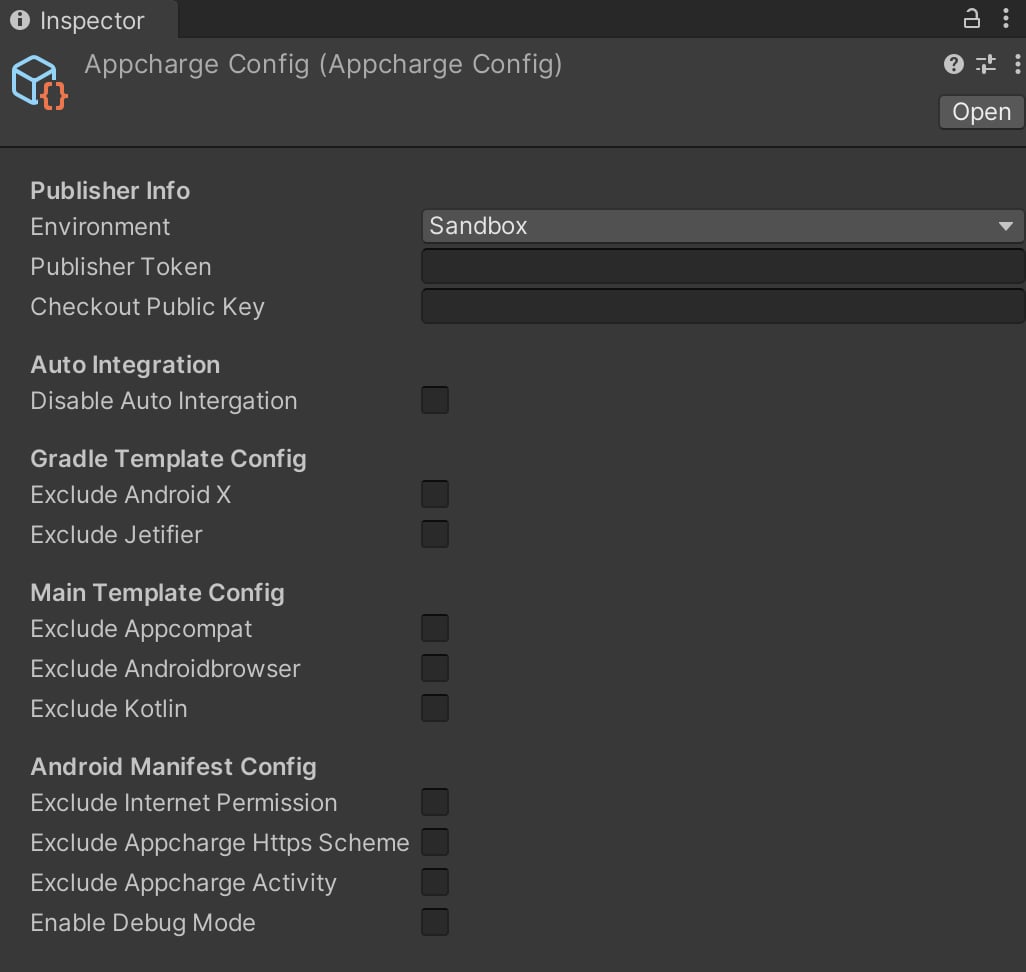 The configuration file is divided into sections:
### Publisher Info
| Property | Value | Description |
| ------------------- | -------- | ------------------------------------------------------------------------------------------------------------ |
| Environment | `Enum` | Setup the checkout environment: Use `Sandbox` for tests and `Production` for Real money. |
| Publisher Token | `String` | Set the publisher token. You may find it by going to the Publisher Dashboard -> Settings -> Integration. |
| Checkout Public Key | `String` | Set the checkout public key. You may find it by going to the Publisher Dashboard -> Settings -> Integration. |
### Auto Integration
| Property | Value | Description |
| ------------------------ | --------- | ------------------------------------------------------------------------------------------------------------------------------------------------------------------------------ |
| Disable Auto Integration | `Boolean` | By default, the SDK will automatically apply necessary configurations during the build process. Check this option to manually set up internal configurations and dependencies. |
***Note:** Disabling this option will prevent the automatic configuration needed for your project to run the Checkout SDK properly. You will then need to manually configure each file as needed.*
### Gradle Template Config
| Property | Value | Description |
| ----------------- | --------- | -------------------------------------------------------------------------------- |
| Exclude Android X | `Boolean` | Exclude the `useAndroidX` property from the `gradleTemplate.properties` file. |
| Exclude Jetifier | `Boolean` | Exclude the `enableJetifier` property from the `gradelTemplate.properties` file. |
If neither option is excluded, the `gradleTemplate.properties` file will look as follows during the build process:
```
**Unity Standart Settings goes here**
**ADDITIONAL_PROPERTIES**
android.useAndroidX=true
android.enableJetifier=true
```
### Main Template Config
| Property | Value | Description |
| ----------------------- | --------- | ---------------------------------------------------------------------------------- |
| Exclude Appcompat | `Boolean` | Exclude the `AppCompat` dependency from the `mainTemplate.gradle` file. |
| Exclude Android Browser | `Boolean` | Exclude the `AndroidbrowserHelper` dependency from the `mainTemplate.gradle` file. |
| Exclude Kotlin | `Boolean` | Exclude the Kotlin packages dependencies from the `mainTemplate.gradle` file. |
If none excluded, final template will look like this:
```
**---------------**
dependencies {
implementation fileTree(dir: 'libs', include: ['*.jar'])
**DEPS**
implementation 'androidx.appcompat:appcompat:1.3.0'
implementation 'com.google.androidbrowserhelper:androidbrowserhelper:2.4.0'
implementation 'org.jetbrains.kotlinx:kotlinx-serialization-json:1.5.1'
implementation 'org.jetbrains.kotlinx:kotlinx-coroutines-core:1.7.1'
}
**---------------**
```
### Android Manifest Config
| Property | Value | Description |
| ------------------------------ | --------- | ------------------------------------------------------------------------------------ |
| Exclude Internet Permission | `Boolean` | Exclude the Internet Permission from the `AndroidManifest.xml` file. |
| Exclude Appcharge Https Scheme | `Boolean` | Exclude the Appcharge's required Https Scheme from the `AndroidManifest.xml` file. |
| Exclude Appcharge Activity | `Boolean` | Exclude the Appcharge's required Activity from the `AndroidManifest.xml` file. |
| Enable Debug Mode | `Boolean` | Enable this to print a summary of the automatic integration changes after the build. |
If the options are not marked as excluded, the final manifest will look like this:
```xml xml theme={"system"}
```
The configuration file is divided into sections:
### Publisher Info
| Property | Value | Description |
| ------------------- | -------- | ------------------------------------------------------------------------------------------------------------ |
| Environment | `Enum` | Setup the checkout environment: Use `Sandbox` for tests and `Production` for Real money. |
| Publisher Token | `String` | Set the publisher token. You may find it by going to the Publisher Dashboard -> Settings -> Integration. |
| Checkout Public Key | `String` | Set the checkout public key. You may find it by going to the Publisher Dashboard -> Settings -> Integration. |
### Auto Integration
| Property | Value | Description |
| ------------------------ | --------- | ------------------------------------------------------------------------------------------------------------------------------------------------------------------------------ |
| Disable Auto Integration | `Boolean` | By default, the SDK will automatically apply necessary configurations during the build process. Check this option to manually set up internal configurations and dependencies. |
***Note:** Disabling this option will prevent the automatic configuration needed for your project to run the Checkout SDK properly. You will then need to manually configure each file as needed.*
### Gradle Template Config
| Property | Value | Description |
| ----------------- | --------- | -------------------------------------------------------------------------------- |
| Exclude Android X | `Boolean` | Exclude the `useAndroidX` property from the `gradleTemplate.properties` file. |
| Exclude Jetifier | `Boolean` | Exclude the `enableJetifier` property from the `gradelTemplate.properties` file. |
If neither option is excluded, the `gradleTemplate.properties` file will look as follows during the build process:
```
**Unity Standart Settings goes here**
**ADDITIONAL_PROPERTIES**
android.useAndroidX=true
android.enableJetifier=true
```
### Main Template Config
| Property | Value | Description |
| ----------------------- | --------- | ---------------------------------------------------------------------------------- |
| Exclude Appcompat | `Boolean` | Exclude the `AppCompat` dependency from the `mainTemplate.gradle` file. |
| Exclude Android Browser | `Boolean` | Exclude the `AndroidbrowserHelper` dependency from the `mainTemplate.gradle` file. |
| Exclude Kotlin | `Boolean` | Exclude the Kotlin packages dependencies from the `mainTemplate.gradle` file. |
If none excluded, final template will look like this:
```
**---------------**
dependencies {
implementation fileTree(dir: 'libs', include: ['*.jar'])
**DEPS**
implementation 'androidx.appcompat:appcompat:1.3.0'
implementation 'com.google.androidbrowserhelper:androidbrowserhelper:2.4.0'
implementation 'org.jetbrains.kotlinx:kotlinx-serialization-json:1.5.1'
implementation 'org.jetbrains.kotlinx:kotlinx-coroutines-core:1.7.1'
}
**---------------**
```
### Android Manifest Config
| Property | Value | Description |
| ------------------------------ | --------- | ------------------------------------------------------------------------------------ |
| Exclude Internet Permission | `Boolean` | Exclude the Internet Permission from the `AndroidManifest.xml` file. |
| Exclude Appcharge Https Scheme | `Boolean` | Exclude the Appcharge's required Https Scheme from the `AndroidManifest.xml` file. |
| Exclude Appcharge Activity | `Boolean` | Exclude the Appcharge's required Activity from the `AndroidManifest.xml` file. |
| Enable Debug Mode | `Boolean` | Enable this to print a summary of the automatic integration changes after the build. |
If the options are not marked as excluded, the final manifest will look like this:
```xml xml theme={"system"}
```