> ## Documentation Index
> Fetch the complete documentation index at: https://docs.appcharge.com/llms.txt
> Use this file to discover all available pages before exploring further.
# Set Up Your Project
This article describes how to set up your iOS Payment Links SDK project.
## Step 1 | Set up a URL scheme
URL Schemes allow your app to handle redirects from embedded checkout flows, including in-app browsers.
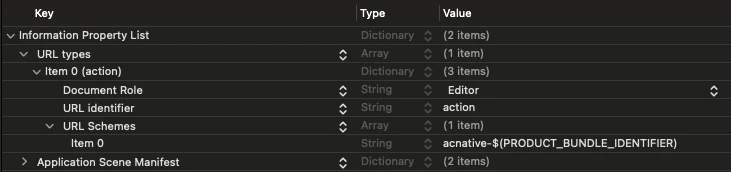
To set up a URL scheme in Xcode:
1. Open your project, select your target, and navigate to the **info.plist** file.
2. In the **Information Property List**, expand the **URL types** section. If it doesn't exist, create it by clicking **+**.
3. Add an **Item** section if it doesn't already exist, and set it to the following:
* **URL identifier**: `action`
* **URL Schemes**: `acnative-$(PRODUCT_BUNDLE_IDENTIFIER)`
 ## Step 2 | Configure a Universal Link
To allow players to return to your game after completing checkout in an external browser, such as Safari, you need to set up a [Universal Link](https://developer.apple.com/documentation/xcode/supporting-universal-links-in-your-app).
Then, in Xcode:
1. Open your project and select your main project file.
2. Go to the **Signing & Capabilities** tab.
3. Click **+ Capability** and search for **Associated Domains**. If you don't see it, ensure you're using a real device configuration.
4. Under **Domains**, add:
```
applinks:{YOUR_DOMAIN}
```
For example:
```
applinks:my-best-game.com
```
We recommend configuring both a URL Scheme and a Universal Link to ensure your app can handle checkout redirects from embedded checkout flows (including in-app browsers) and external browsers.
## Step 3 | Register deeplink handlers
After a player completes a purchase or exits the checkout, they are redirected back to your app via a deeplink.
Your app must capture this URL and forward it to the Appcharge SDK to finalize the transaction.
If your app already handles deeplinks, call the Bridge `handleDeepLink` method within your existing handlers to forward the URL to the Appcharge SDK.
If your app doesn't already handle deeplinks, add the following methods in your `SceneDelegate`:
```swift Swift theme={"system"}
import ACPaymentLinks
// When the app is opened via URL Scheme
func scene(_ scene: UIScene, openURLContexts URLContexts: Set) {
guard let url = URLContexts.first?.url else { return }
ACBridgeAPI.handleDeepLink(url)
}
// When the app is opened via Universal Link
func scene(_ scene: UIScene, continue userActivity: NSUserActivity) {
if userActivity.activityType == NSUserActivityTypeBrowsingWeb,
let url = userActivity.webpageURL {
ACBridgeAPI.handleDeepLink(url)
}
}
```
```c Objective-C theme={"system"}
#import
#import
// When the app is opened via URL Scheme
- (void)scene:(UIScene *)scene openURLContexts:(NSSet *)URLContexts {
NSURL *url = URLContexts.anyObject.URL;
if (url) {
[ACBridgeAPI handleDeepLink:url];
}
}
// When the app is opened via Universal Link
- (void)scene:(UIScene *)scene continueUserActivity:(NSUserActivity *)userActivity {
if ([userActivity.activityType isEqualToString:NSUserActivityTypeBrowsingWeb]) {
NSURL *url = userActivity.webpageURL;
if (url) {
[ACBridgeAPI handleDeepLink:url];
}
}
}
```
If you don't have a `SceneDelegate`, use the `AppDelegate`:
```swift Swift theme={"system"}
import ACPaymentLinks
func application(_ app: UIApplication, open url: URL, options: [UIApplication.OpenURLOptionsKey : Any] = [:]) -> Bool {
ACBridgeAPI.handleDeepLink(url)
return false
}
```
```c Objective-C theme={"system"}
- (BOOL)application:(UIApplication *)app openURL:(NSURL *)url options:(NSDictionary *)options {
[ACBridgeAPI handleDeepLink:url];
return NO;
}
```
## Step 2 | Configure a Universal Link
To allow players to return to your game after completing checkout in an external browser, such as Safari, you need to set up a [Universal Link](https://developer.apple.com/documentation/xcode/supporting-universal-links-in-your-app).
Then, in Xcode:
1. Open your project and select your main project file.
2. Go to the **Signing & Capabilities** tab.
3. Click **+ Capability** and search for **Associated Domains**. If you don't see it, ensure you're using a real device configuration.
4. Under **Domains**, add:
```
applinks:{YOUR_DOMAIN}
```
For example:
```
applinks:my-best-game.com
```
We recommend configuring both a URL Scheme and a Universal Link to ensure your app can handle checkout redirects from embedded checkout flows (including in-app browsers) and external browsers.
## Step 3 | Register deeplink handlers
After a player completes a purchase or exits the checkout, they are redirected back to your app via a deeplink.
Your app must capture this URL and forward it to the Appcharge SDK to finalize the transaction.
If your app already handles deeplinks, call the Bridge `handleDeepLink` method within your existing handlers to forward the URL to the Appcharge SDK.
If your app doesn't already handle deeplinks, add the following methods in your `SceneDelegate`:
```swift Swift theme={"system"}
import ACPaymentLinks
// When the app is opened via URL Scheme
func scene(_ scene: UIScene, openURLContexts URLContexts: Set) {
guard let url = URLContexts.first?.url else { return }
ACBridgeAPI.handleDeepLink(url)
}
// When the app is opened via Universal Link
func scene(_ scene: UIScene, continue userActivity: NSUserActivity) {
if userActivity.activityType == NSUserActivityTypeBrowsingWeb,
let url = userActivity.webpageURL {
ACBridgeAPI.handleDeepLink(url)
}
}
```
```c Objective-C theme={"system"}
#import
#import
// When the app is opened via URL Scheme
- (void)scene:(UIScene *)scene openURLContexts:(NSSet *)URLContexts {
NSURL *url = URLContexts.anyObject.URL;
if (url) {
[ACBridgeAPI handleDeepLink:url];
}
}
// When the app is opened via Universal Link
- (void)scene:(UIScene *)scene continueUserActivity:(NSUserActivity *)userActivity {
if ([userActivity.activityType isEqualToString:NSUserActivityTypeBrowsingWeb]) {
NSURL *url = userActivity.webpageURL;
if (url) {
[ACBridgeAPI handleDeepLink:url];
}
}
}
```
If you don't have a `SceneDelegate`, use the `AppDelegate`:
```swift Swift theme={"system"}
import ACPaymentLinks
func application(_ app: UIApplication, open url: URL, options: [UIApplication.OpenURLOptionsKey : Any] = [:]) -> Bool {
ACBridgeAPI.handleDeepLink(url)
return false
}
```
```c Objective-C theme={"system"}
- (BOOL)application:(UIApplication *)app openURL:(NSURL *)url options:(NSDictionary *)options {
[ACBridgeAPI handleDeepLink:url];
return NO;
}
```