> ## Documentation Index
> Fetch the complete documentation index at: https://docs.appcharge.com/llms.txt
> Use this file to discover all available pages before exploring further.
# Integrate with Android
This article explains how to integrate Unity Payment Links with the Android platform.
To integrate with Android:
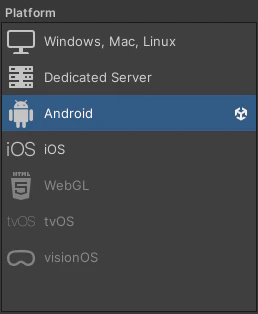
1. Go to the **Build Settings** window and make sure your Unity project is set to **Android**. Once set, the `AppchargeConfig` file updates to display Android-specific configuration options.
 2. Click **Player Settings > Publisher Settings**, and scroll to the **Build** section.
3. Expose (enable) the following android plugin files or the build process will be passed without changes:
* Custom Main Manifest (`AndroidManifest.xml`)
* Custom Main Gradle Template (`mainTemplate.gradle`)
* Custom Gradle Properties Template (`gradleTemplate.properties`)
2. Click **Player Settings > Publisher Settings**, and scroll to the **Build** section.
3. Expose (enable) the following android plugin files or the build process will be passed without changes:
* Custom Main Manifest (`AndroidManifest.xml`)
* Custom Main Gradle Template (`mainTemplate.gradle`)
* Custom Gradle Properties Template (`gradleTemplate.properties`)
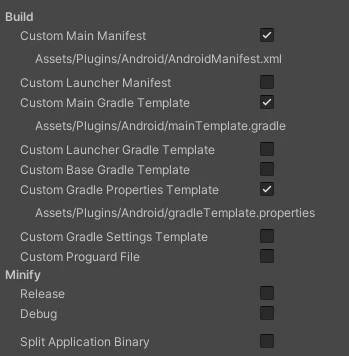 4. Your configuration settings should look like this:
 By default, the configuration file is preconfigured for integration. However, you must set the required **Environment** and **Checkout Public Key** fields under **Publisher Info**.
## Publisher Info
These settings can also be changed at runtime, but doing so requires [re-initializing the SDK](./initialize-the-payment-links-sdk#re-initialize-the-sdk).
| Property | Value | Description |
| ------------------- | -------- | ------------------------------------------------------------------------------------------------------------------ |
| Environment | `Enum` | Sets the checkout environment. Use `Sandbox` for testing and `Production` for live payments. |
| Checkout Public Key | `String` | Defines the checkout public key. You can find it by going to the **Publisher Dashboard → Settings → Integration**. |
## Platform Auto Integration Settings
| Property | Value | Description |
| -------------------- | ------ | ------------------------------------------------------------------------------------------------------------------------------------------------- |
| Android Browser Mode | `Enum` | Sets how the checkout is opened. Use `TWA` for Trusted Web Activity, `CCT` for Custom Chrome Tab, or `External` for the device's default browser. |
### Gradle Properties
These settings automatically modify your `AndroidManifest.xml` and Gradle files to include all necessary dependencies at build time.\
You can choose to exclude or disable specific dependencies based on your project’s needs.
| Property | Value | Description |
| ----------------- | --------- | -------------------------------------------------------------------------------- |
| Exclude Android X | `Boolean` | Exclude the `useAndroidX` property from the `gradleTemplate.properties` file. |
| Exclude Jetifier | `Boolean` | Exclude the `enableJetifier` property from the `gradleTemplate.properties` file. |
```
**Unity Standart Settings goes here**
**ADDITIONAL_PROPERTIES**
android.useAndroidX=true
android.enableJetifier=true
```
### Gradle Dependencies
| Property | Value | Description |
| --------------------------------- | --------- | ---------------------------------------------------------------------------------- |
| Exclude Core Ktx | `Boolean` | Exclude Kotlin core dependency from the `mainTemplate.gradle` file. |
| Exclude Activity Ktx | `Boolean` | Exclude Kotlin activity dependency from the `mainTemplate.gradle` file. |
| Exclude Android Browser Helper | `Boolean` | Exclude the `AndroidBrowserHelper` dependency from the `mainTemplate.gradle` file. |
| Exclude Android X Browser | `Boolean` | Exclude the `Android X` dependency from the `mainTemplate.gradle` file. |
| Exclude Kotlin Serialization Json | `Boolean` | Exclude the `Serialization` dependency from the `mainTemplate.gradle` file. |
| Exclude Kotlin Coroutine Core | `Boolean` | Exclude the `Coroutine Core` dependency from the `mainTemplate.gradle` file. |
```
**---------------**
dependencies {
implementation fileTree(dir: 'libs', include: ['*.jar'])
implementation 'androidx.core:core-ktx:1.13.1'
implementation 'androidx.activity:activity-ktx:1.3.0'
implementation 'com.google.androidbrowserhelper:androidbrowserhelper:2.4.0'
implementation 'androidx.browser:browser:1.8.0'
implementation 'org.jetbrains.kotlinx:kotlinx-serialization-json:1.5.1'
implementation 'org.jetbrains.kotlinx:kotlinx-coroutines-core:1.7.1'
**DEPS**
}
**---------------**
```
### Manifest Modifications
| Property | Value | Description |
| ----------------------------------------- | --------- | ---------------------------------------------------------------------------- |
| Exclude Internet Permission | `Boolean` | Exclude the Internet permission from `AndroidManifest.xml`. |
| Exclude Queries Block | `Boolean` | Exclude Appcharge’s HTTPS scheme query block from the manifest. |
| Exclude Checkout Service | `Boolean` | Exclude the checkout foreground service permissions and service declaration. |
| Exclude Appcharge Activity | `Boolean` | Exclude the Appcharge Checkout activity. |
| Exclude Exported Attribute | `Boolean` | Exclude the `android:exported` attribute from the Checkout activity. |
| Exclude Discouraged Api Tool | `Boolean` | Exclude `` from the Checkout activity. |
| Exclude Appcharge Activity Intent Filters | `Boolean` | Exclude intent filters from the Appcharge Checkout activity. |
| Exclude Custom Scheme | `Boolean` | Exclude the `` entry. |
| Exclude Custom Host | `Boolean` | Exclude the `` entry. |
| Exclude Https Scheme In Activity | `Boolean` | Exclude the `` entry from the intent filter. |
* If **Exclude Checkout Service** isn't checked, the SDK automatically adds the required permissions and the `CheckoutService` declaration to your manifest file without duplicating existing permissions. If **Exclude Checkout Service** is checked, the SDK doesn't modify your manifest file.
* If you're upgrading an existing integration that already includes the `CheckoutService` declaration, update `android:foregroundServiceType` from `dataSync` to `shortService` in your manifest.
### Example Manifest
If the options above are **not** excluded (disabled), your final Manifest will look like this:
```xml xml theme={"system"}
```
The **`intent-filter`** includes a scheme **`"acnative-{IDENTIFIER}"`**. Change the **\{IDENTIFIER}** to the last sequence of your package name. For example, if your package name is **`com.appcharge.mysupergame`**, the identifier will be **`mysupergame`**.
This name must be lowercase with no spaces, according to the [Android code style guide](https://source.android.com/docs/core/architecture/hidl/code-style).
### General Auto Integration Settings
| Property | Value | Description |
| -------------------------- | --------- | ---------------------------------------------------------------------------------------------------------------------------------------------------------- |
| Enable Integration Options | `Boolean` | Determines whether the SDK automatically applies required Xcode configurations during build. If disabled, you’ll need to configure them manually in Xcode. |
| Enable Debug Mode | `Boolean` | Enable this to print a summary of the automatic integration changes after the build. |
Disabling **Enable Integration Options** prevents automatic configuration required for the Checkout SDK from functioning correctly. If disabled, you must manually configure each required file.
By default, the configuration file is preconfigured for integration. However, you must set the required **Environment** and **Checkout Public Key** fields under **Publisher Info**.
## Publisher Info
These settings can also be changed at runtime, but doing so requires [re-initializing the SDK](./initialize-the-payment-links-sdk#re-initialize-the-sdk).
| Property | Value | Description |
| ------------------- | -------- | ------------------------------------------------------------------------------------------------------------------ |
| Environment | `Enum` | Sets the checkout environment. Use `Sandbox` for testing and `Production` for live payments. |
| Checkout Public Key | `String` | Defines the checkout public key. You can find it by going to the **Publisher Dashboard → Settings → Integration**. |
## Platform Auto Integration Settings
| Property | Value | Description |
| -------------------- | ------ | ------------------------------------------------------------------------------------------------------------------------------------------------- |
| Android Browser Mode | `Enum` | Sets how the checkout is opened. Use `TWA` for Trusted Web Activity, `CCT` for Custom Chrome Tab, or `External` for the device's default browser. |
### Gradle Properties
These settings automatically modify your `AndroidManifest.xml` and Gradle files to include all necessary dependencies at build time.\
You can choose to exclude or disable specific dependencies based on your project’s needs.
| Property | Value | Description |
| ----------------- | --------- | -------------------------------------------------------------------------------- |
| Exclude Android X | `Boolean` | Exclude the `useAndroidX` property from the `gradleTemplate.properties` file. |
| Exclude Jetifier | `Boolean` | Exclude the `enableJetifier` property from the `gradleTemplate.properties` file. |
```
**Unity Standart Settings goes here**
**ADDITIONAL_PROPERTIES**
android.useAndroidX=true
android.enableJetifier=true
```
### Gradle Dependencies
| Property | Value | Description |
| --------------------------------- | --------- | ---------------------------------------------------------------------------------- |
| Exclude Core Ktx | `Boolean` | Exclude Kotlin core dependency from the `mainTemplate.gradle` file. |
| Exclude Activity Ktx | `Boolean` | Exclude Kotlin activity dependency from the `mainTemplate.gradle` file. |
| Exclude Android Browser Helper | `Boolean` | Exclude the `AndroidBrowserHelper` dependency from the `mainTemplate.gradle` file. |
| Exclude Android X Browser | `Boolean` | Exclude the `Android X` dependency from the `mainTemplate.gradle` file. |
| Exclude Kotlin Serialization Json | `Boolean` | Exclude the `Serialization` dependency from the `mainTemplate.gradle` file. |
| Exclude Kotlin Coroutine Core | `Boolean` | Exclude the `Coroutine Core` dependency from the `mainTemplate.gradle` file. |
```
**---------------**
dependencies {
implementation fileTree(dir: 'libs', include: ['*.jar'])
implementation 'androidx.core:core-ktx:1.13.1'
implementation 'androidx.activity:activity-ktx:1.3.0'
implementation 'com.google.androidbrowserhelper:androidbrowserhelper:2.4.0'
implementation 'androidx.browser:browser:1.8.0'
implementation 'org.jetbrains.kotlinx:kotlinx-serialization-json:1.5.1'
implementation 'org.jetbrains.kotlinx:kotlinx-coroutines-core:1.7.1'
**DEPS**
}
**---------------**
```
### Manifest Modifications
| Property | Value | Description |
| ----------------------------------------- | --------- | ---------------------------------------------------------------------------- |
| Exclude Internet Permission | `Boolean` | Exclude the Internet permission from `AndroidManifest.xml`. |
| Exclude Queries Block | `Boolean` | Exclude Appcharge’s HTTPS scheme query block from the manifest. |
| Exclude Checkout Service | `Boolean` | Exclude the checkout foreground service permissions and service declaration. |
| Exclude Appcharge Activity | `Boolean` | Exclude the Appcharge Checkout activity. |
| Exclude Exported Attribute | `Boolean` | Exclude the `android:exported` attribute from the Checkout activity. |
| Exclude Discouraged Api Tool | `Boolean` | Exclude `` from the Checkout activity. |
| Exclude Appcharge Activity Intent Filters | `Boolean` | Exclude intent filters from the Appcharge Checkout activity. |
| Exclude Custom Scheme | `Boolean` | Exclude the `` entry. |
| Exclude Custom Host | `Boolean` | Exclude the `` entry. |
| Exclude Https Scheme In Activity | `Boolean` | Exclude the `` entry from the intent filter. |
* If **Exclude Checkout Service** isn't checked, the SDK automatically adds the required permissions and the `CheckoutService` declaration to your manifest file without duplicating existing permissions. If **Exclude Checkout Service** is checked, the SDK doesn't modify your manifest file.
* If you're upgrading an existing integration that already includes the `CheckoutService` declaration, update `android:foregroundServiceType` from `dataSync` to `shortService` in your manifest.
### Example Manifest
If the options above are **not** excluded (disabled), your final Manifest will look like this:
```xml xml theme={"system"}
```
The **`intent-filter`** includes a scheme **`"acnative-{IDENTIFIER}"`**. Change the **\{IDENTIFIER}** to the last sequence of your package name. For example, if your package name is **`com.appcharge.mysupergame`**, the identifier will be **`mysupergame`**.
This name must be lowercase with no spaces, according to the [Android code style guide](https://source.android.com/docs/core/architecture/hidl/code-style).
### General Auto Integration Settings
| Property | Value | Description |
| -------------------------- | --------- | ---------------------------------------------------------------------------------------------------------------------------------------------------------- |
| Enable Integration Options | `Boolean` | Determines whether the SDK automatically applies required Xcode configurations during build. If disabled, you’ll need to configure them manually in Xcode. |
| Enable Debug Mode | `Boolean` | Enable this to print a summary of the automatic integration changes after the build. |
Disabling **Enable Integration Options** prevents automatic configuration required for the Checkout SDK from functioning correctly. If disabled, you must manually configure each required file.