Import the SDK
To import the WebGL SDK into your Unity project, use one of the following methods:- Double-click the Unity package file in your system directory to open and import it into Unity.
- Go to Assets > Import Package within your WebGL Unity project and import the Unity package file.
Configure the SDK
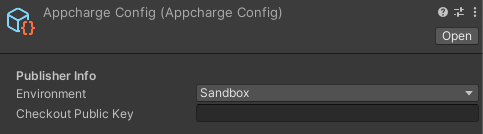
To configure the SDK:- Go to Assets > Resources > Appcharge. You should see an AppchargeConfig file. If the file doesn’t exist, create one by right-clicking the Appcharge folder and selecting Create > Appcharge > Configuration > AppchargeConfig.
- Select the AppchargeConfig file. In the Inspector tab, enter your information in the required fields: