
Step 1 | Set up a URL scheme
URL Schemes allow your app to handle redirects from embedded checkout flows, including in-app browsers. To set up a URL scheme in Xcode:- Open your project, select your target, and navigate to the info.plist file.
- In the Information Property List, expand the URL types section. If it doesn’t exist, create it by clicking +.
-
Add an Item section if it doesn’t already exist, and set it to the following:
- URL identifier:
action - URL Schemes:
acnative-$(PRODUCT_BUNDLE_IDENTIFIER)
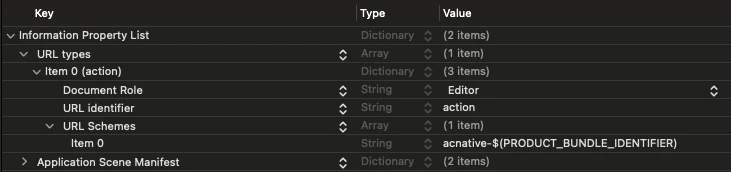
- URL identifier:
Step 2 | Configure a Universal Link
To allow players to return to your game after completing checkout in an external browser, such as Safari, you need to set up a Universal Link. Then, in Xcode:- Open your project and select your main project file.
- Go to the Signing & Capabilities tab.
- Click + Capability and search for Associated Domains. If you don’t see it, ensure you’re using a real device configuration.
-
Under Domains, add:
For example:
We recommend configuring both a URL Scheme and a Universal Link to ensure your app can handle checkout redirects from embedded checkout flows (including in-app browsers) and external browsers.
Step 3 | Register deeplink handlers
After a player completes a purchase or exits the checkout, they are redirected back to your app via a deeplink. Your app must capture this URL and forward it to the Appcharge SDK to finalize the transaction. If your app already handles deeplinks, call the BridgehandleDeepLink method within your existing handlers to forward the URL to the Appcharge SDK.
If your app doesn’t already handle deeplinks, add the following methods in your SceneDelegate:
SceneDelegate, use the AppDelegate: