
This article explains how to set up the Payment Links SDK for Unity. You can install it via UPM (Unity Package Manager) or manually.

Requirements

PlatformRequirement
UnityVersion 2021.3.45f2 or higher
iOS
  • iOS: Minimum version 13.0 or higher
  • Xcode: Version 16.0 or higher
AndroidMinimum target level: 24

Import the SDK via UPM

To import the SDK into your Unity project using UPM:
  1. Copy the URL below to use in a later step:
https://github.com/Appcharge/unity-payment-links.git
  1. Open your Unity project.
  2. Go to Window > Package Manager.
  3. In the Package Manager window, click the + button and select Add package from git URL. UPM Import
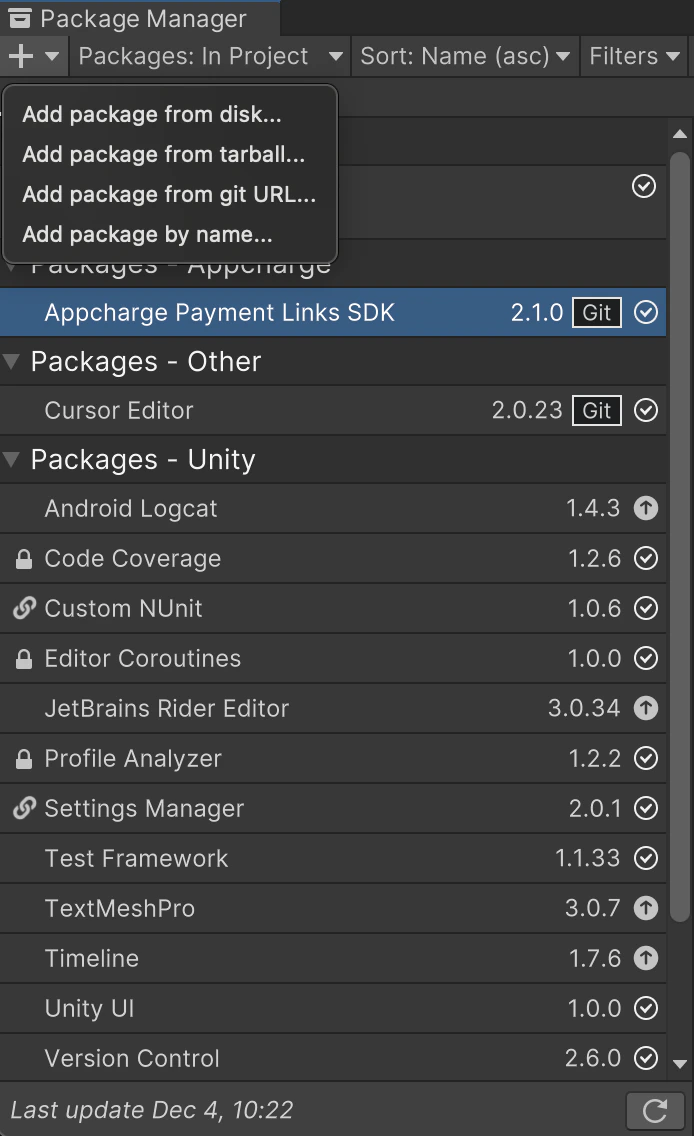
  4. Paste the copied HTTPS URL, and click Add.

Import the SDK manually

Manual installation requires the .xcframework folder. Contact your account manager to obtain it.
To import the SDK into your Unity project:
  1. Open your Unity project.
  2. Do one of the following:
    • Double-click the package file, or
    • Drag and drop the package file into your Assets folder.
If you need to re-import the SDK, make sure to manually delete all files and folders from any previous version of the SDK in your Unity project.