
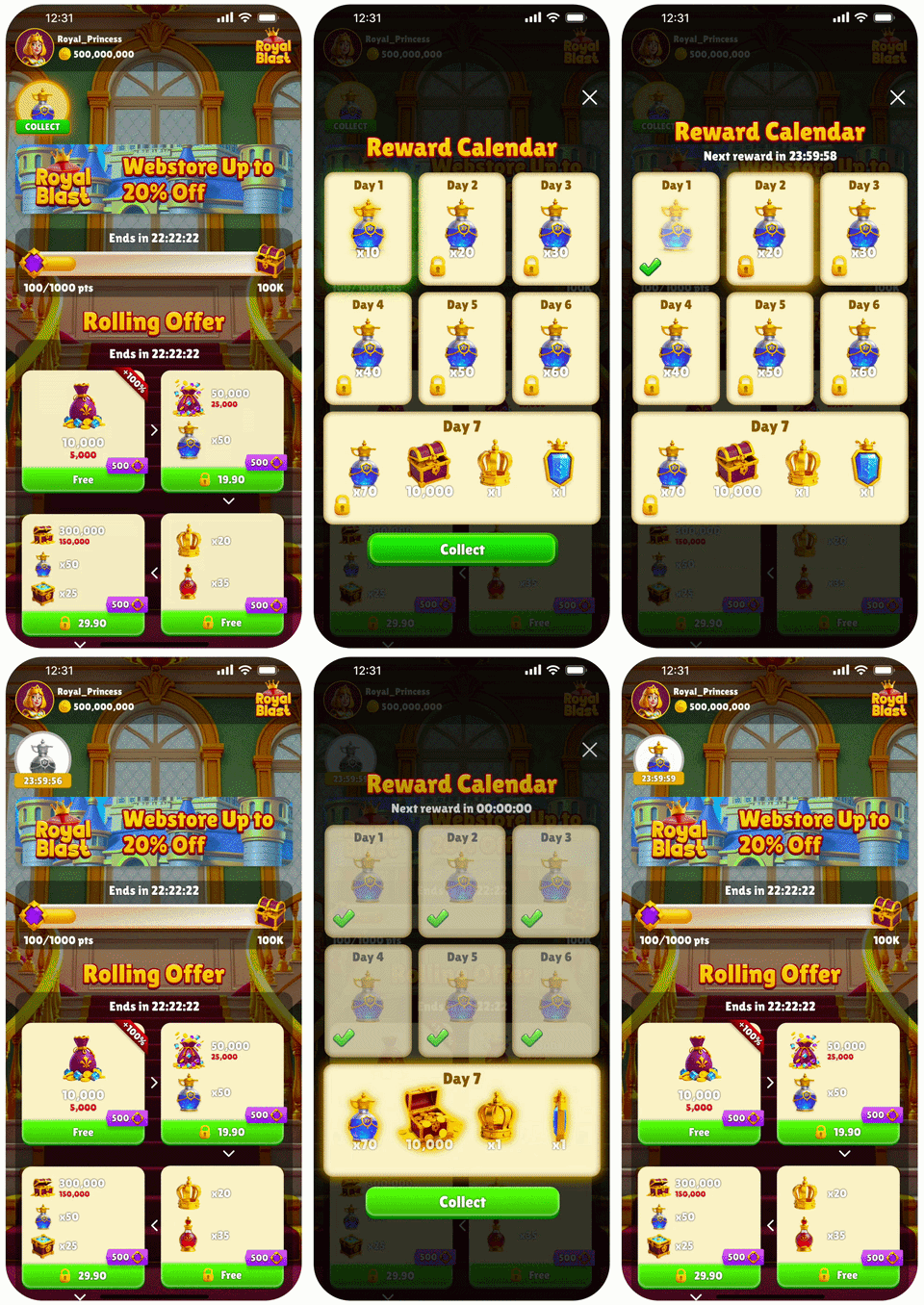
How it works
Each Reward Calendar displays 7 days of rewards. You can configure up to 10 weeks, and each week contains its own 7-day reward sequence. Each day has its own reward. Days 1-6 are sub rewards displayed as regular calendar day tiles. Day 7 is the main reward and appears as a larger, wider featured reward tile. A reward can include one or more products. The web store displays a persistent Reward Calendar badge that players can click to open the calendar, view upcoming rewards, and see when the next reward becomes available. You can configure whether the calendar popup opens automatically when a player becomes eligible for a reward, or only after the player clicks the badge. The badge remains visible in both modes. When a player is eligible for the next reward, the current day appears as collectible in the calendar. If the player isn’t eligible yet, the Reward Calendar appears as a badge with a countdown timer for the next available reward.Reward collection
You can choose how players collect daily rewards:- Forced collection: The player must collect the reward and can’t dismiss the popup.
- Manual collection: The player can collect the reward or close the popup and collect it later that day.
Calendar progression
Reward Calendars support multi-week progression. After a player completes Week 1, the player advances to Week 2, and so on until the final configured week. After the player completes all configured weeks, you can choose whether the calendar restarts from Week 1 or ends for that player.Missed day reset behavior
If a player misses a day, the calendar resets according to the reset behavior you configure:- Complete Reset: The player restarts from Week 1, Day 1.
- Weekly Reset: The player restarts from Day 1 of the current week.
- With Complete Reset, the player returns to Week 1, Day 1.
- With Weekly Reset, the player returns to Week 3, Day 1.
Daily reset
Each day’s reward in the Reward Calendar remains available and collectible until the daily reset, at 00:00 in the timezone set in the Publisher Dashboard. Learn how to set the daily reset timezone. The default timezone is UTC+00:00. After the daily reset, the player can collect the next day’s reward in the calendar.Priority
You can assign each Reward Calendar a priority to control the order in which active Reward Calendars appear. Lower priority numbers appear first. If multiple Reward Calendars have the same priority, the one created first appears first. Priority also applies across all eligible offers that use a popup modal such as Store Refresh Popups and Daily Bonus offers, and determines the display order.Key features
- 7-day calendar: Show players a full week of rewards.
- Multi-week progression: Configure up to 10 weeks of daily rewards.
- Persistent badge: Keep the calendar accessible from the web store.